IEP Desk is a platform that helps parents and IEP advocates navigate the U.S. special education process — understanding rights, preparing for meetings, generating formal letters and tracking progress. Parents get the tools, knowledge and confidence to advocate for their child. Advocates get a full dashboard to run their practice and work with every family. One bilingual platform — English and Spanish.

The real problem
Every year, millions of parents sit across the table from trained professionals — without the knowledge, documents or confidence to advocate effectively for their child.

The IEP process involves federal law, strict deadlines and district procedures most parents have never encountered. Advocates and attorneys cost hundreds of dollars per hour — money most families simply don't have.
Annual reviews, triennial evaluations, 60-day deadlines, meeting notes, progress reports, school communications... The paperwork is relentless, and the stakes are high when something falls through the cracks.
For millions of Spanish-speaking families navigating the US special education system, the language barrier adds an extra layer of difficulty to an already overwhelming process. Every tool, every form — English only.
Your child's IEP, under control
From understanding your rights to preparing for meetings and tracking progress — all in one place, in English and Spanish.
What IEP Desk does
From uploading your child's IEP to generating formal letters, tracking progress and knowing your rights — everything in one place. Now including specialist report analysis, a 1,100+ goal bank, and direct collaboration with your advocate.
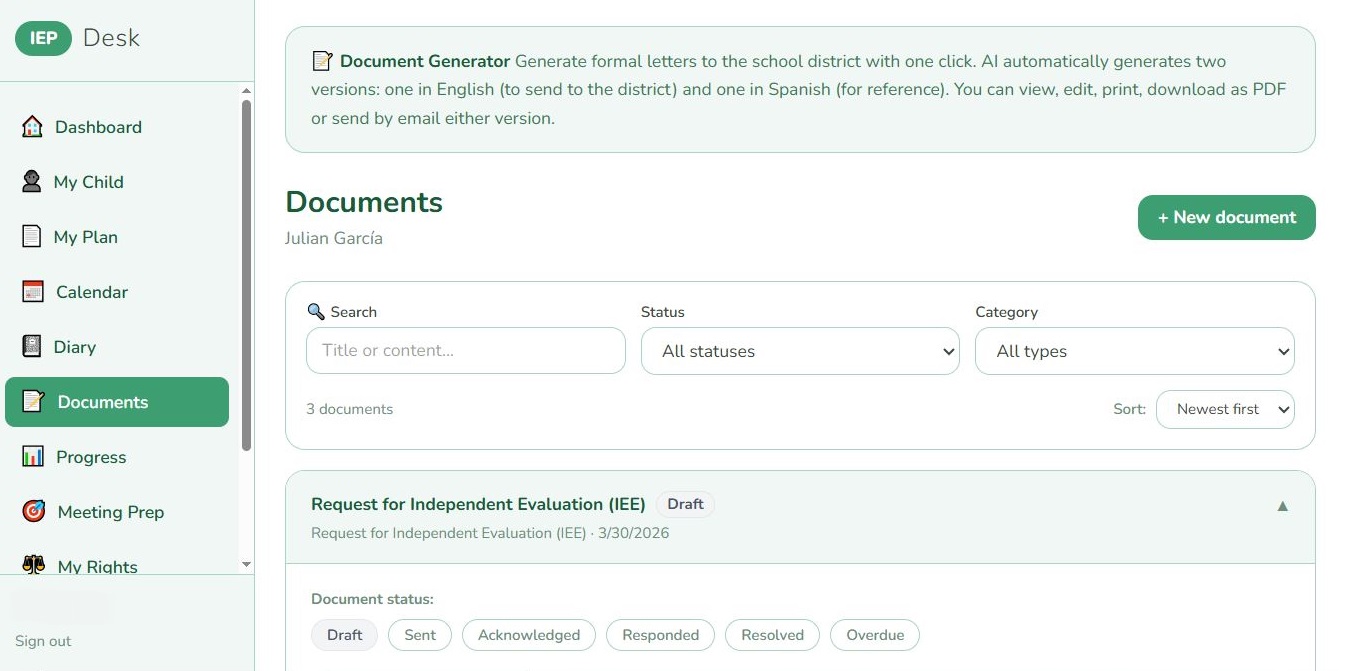
Choose from 25 types of formal letters — meeting requests, evaluation demands, due process notices, complaints and more. The AI uses your child's IEP data and federal law to draft professionally grounded documents, ready to send.
🔍 Click to enlarge
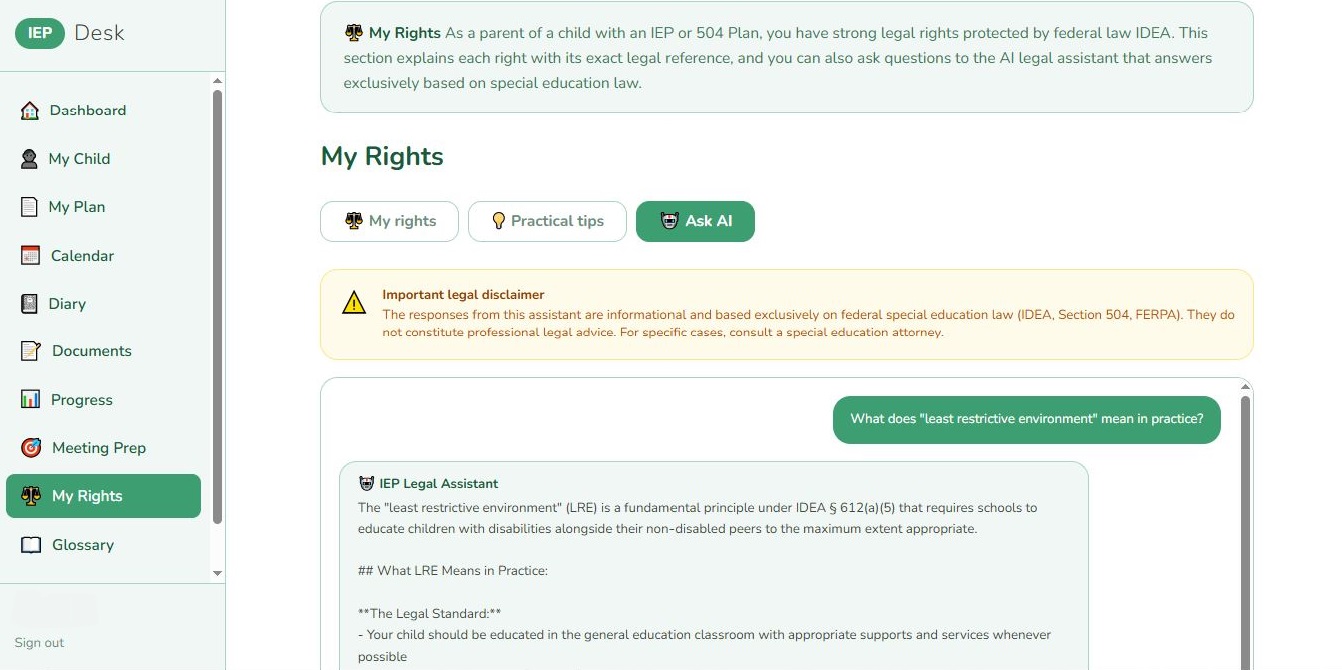
Every right you have under IDEA, Section 504 and FERPA — explained clearly with the exact regulatory citation. When you have a specific question, the AI Assistant answers based exclusively on federal special education law.
🔍 Click to enlarge
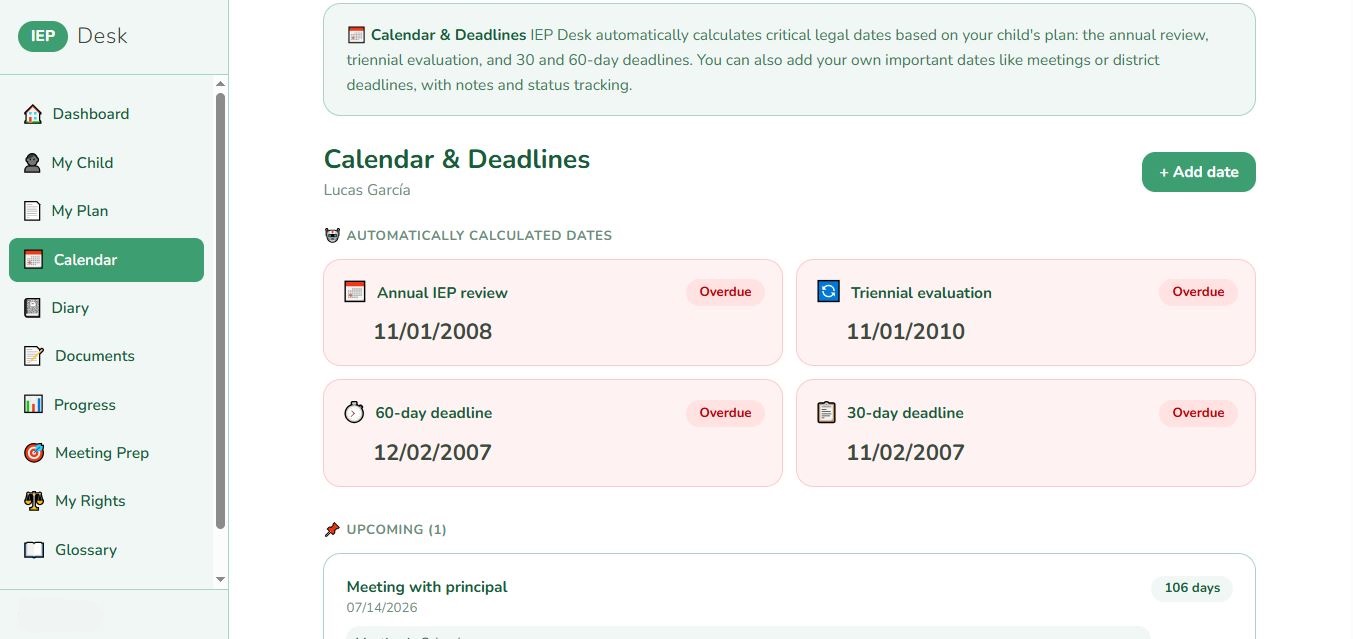
IEP Desk reads your uploaded plan and automatically calculates the annual review, triennial evaluation, and 30 and 60-day deadlines. Color-coded alerts tell you exactly how much time you have.
🔍 Click to enlarge
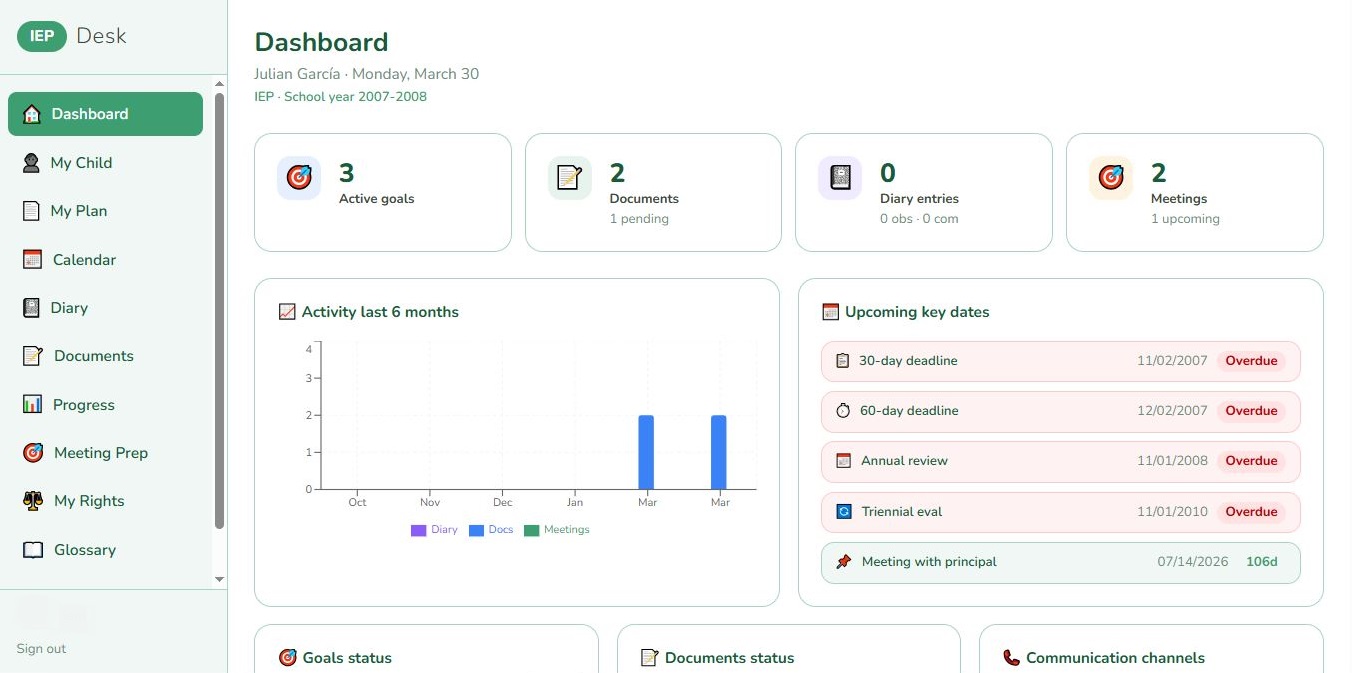
Your dashboard shows active IEP goals with progress bars, upcoming critical dates, a 6-month activity chart, document status and pending communications — all in real time, all in one screen.
🔍 Click to enlarge
Every tool a parent needs — in one platform.
Complete child profile with disability categories, impact areas and IEP team contacts in one place.
Upload your IEP PDF and AI extracts the full plan in depth — present levels, goals with target dates, services with frequency and duration, LRE, accommodations, behavior supports and transition — organized into clean, collapsible sections.
Log home observations and school communications. Attach documents. Build your record.
Track each IEP goal with numeric values, visual progress bars and evolution charts over time.
Pre-meeting checklist, AI-generated questions specific to your child's IEP, and post-meeting notes.
Complete activity timeline. Export everything as a PDF for disputes or your own records.
Upload specialist evaluations (psychologist, SLP, OT, ABA and more). AI generates a structured summary of each report. Share securely with your advocate directly from the app.
Search over 1,100 research-based IEP goals organized by disability and area. Propose goals directly for your next meeting — in English and Spanish.
A demo account lets you explore IEP Desk as a parent with sample data already loaded — no setup, nothing to fill in. Just look around and see how everything works before you start with your own child's information.
Prefer to dive in? You can also create your own free account any time and start using it right away.
IDEA sets the national baseline. But evaluation timelines, burden of proof, transition ages and eligibility rules change from state to state — and that's where an IEP is actually won or lost.
Pick a state and every answer comes in two layers: the federal rule first, then what that state does differently or beyond it — each one quoted with its exact legal citation, across all 50 states and the District of Columbia.
Finally see the protections your own state gives your child — not just the federal minimum everyone quotes. Ask a question, choose your state, and get a clear answer in plain language, with the exact rule it comes from.
Many states go beyond IDEA. Now you'll know when yours does, before you walk into the meeting.
A sourced, state-by-state legal reference ready in seconds — right before a meeting or while building a case. Evaluation timelines, burden of proof, transition and exit ages, developmental-delay definitions, state complaint deadlines, each with its citation.
Take cases in more than one state without carrying 51 sets of rules in your head. The technical, no-frills answer is one click away.
Every state rule is checked against the actual law and shown with its citation — not AI guesswork.
When no verified rule exists for a question, it says so and applies the federal standard — instead of making up a deadline or a right.
Two clear layers in every answer: what IDEA requires nationally, and what your state adds on top.
Who it's for
Whether you're just starting out or you've been in this for years, IEP Desk meets you where you are.
You just received your child's first IEP and you're not sure what it means, what your rights are or what to do next. IEP Desk walks you through everything step by step.
The school isn't providing the services in the IEP. Deadlines are being missed. You need documentation, formal letters and a clear record of every communication. IEP Desk is your paper trail.
You understand your child's needs perfectly — but the IEP system operates in another language. IEP Desk is fully bilingual: every feature, every formal letter, every right explained in Spanish.
Run your whole practice from one place: a CRM for clients and prospects, your own calendar, online booking, time and fee tracking, analytics, and in-app messaging with every family — plus real-time collaboration on each child you support.
Run your practice, all in one place
A full practice dashboard — clients, calendar, booking, billing and analytics — plus real-time collaboration with every family you support.
You take cases where the families are, not where the rules are simplest. The Rights assistant answers with the law of the state you choose: evaluation timelines, burden of proof, transition and exit ages, developmental-delay definitions and state complaint deadlines — each one quoted with its exact citation, across all 50 states and DC.
Every rule is verified against the actual law, not generated on the fly. No rule on record? It says so and applies the federal standard — it won't hand you a citation that doesn't exist.
Open the state-by-state reference →Example · Evaluation timeline in Texas
FEDERAL (IDEA)
Initial evaluation within 60 days of parental consent. 34 CFR §300.301(c)
TEXAS
45 school days from parental consent to complete the evaluation — a different clock than the federal count. 19 TAC §89.1011
Practice + collaboration
IEP Desk is the first platform where advocates run their whole practice and work with parents in real time — from the same place. And during beta, advocate accounts are completely free.
You no longer have to wait for a family to sign up. Take the case however it comes to you.
If they use IEP Desk
The parent invites you and shares exactly what they choose. Their IEP, goals and reports appear in your dashboard in real time — no files by email.
If they don't
Add the student under My Students, upload their IEP and evaluations, and run the whole case from your dashboard — no family account required. If they join later, transfer the case to them in one step and keep your access.
New in v2.0 — a full advocate portal, not just a parent add-on.
Manage a child's full IEP directly — upload the IEP and evaluations, prepare meetings and track progress — even when the family doesn't use IEP Desk. Hand the case over to them anytime they join.
Twelve families, their notes in three places, their deadlines in your head. One record per family instead: the child, the district, where the case stands and what you owe them next.
All your meetings and bookings in one calendar, shown in your own time zone, with a clear view of what's coming up.
A Calendly-style booking page. Existing families book a slot, and a public link lets new prospects book a consultation directly.
Set your meeting modality, cost and contact details. Prospects who book through your link land straight in your CRM, tagged automatically.
Log your hours per case and set flexible pricing per family — hourly, per session, flat fee or pro-bono. Totals add up for you, kept private.
See your activity over time — meetings, consultations, prospects, and hours and income per case — at a glance.
In-app messaging with every family, organized by child. Start a new conversation by searching for the student — no email needed.
Keep working notes per family, and share them with the parent when it helps keep everyone on the same page.
A demo account lets you explore the full advocate portal with sample families and data already loaded — a CRM, calendar, bookings, billing and analytics, all populated. No setup, just look around and see how it works.
Ready already? You can also create your free advocate account any time and start working with your families right away.
Are you an IEP Advocate?
Create your free advocate account and run your practice and your family collaboration from one place. Your dashboard is ready.
Also available in Spanish
Not a Google Translate button. Not a toggle that breaks half the features. IEP Desk was built bilingual from day one — every module, every AI-generated document, every reference to the law.
When a parent generates a formal letter, they receive two complete versions: English to send to the district, Spanish to understand exactly what they're sending.
View the Spanish version ›
Meeting preparation
IEP Desk prepares you before each meeting with a structured checklist, AI-generated questions specific to your child's plan, and a place to record everything agreed afterward.

Did you know? Parents have the right to bring an advocate, a family member, or any trusted person to an IEP meeting. IEP Desk's Meeting Prep module tells you exactly what rights apply — before you even sit down.
Pricing
Every feature is free while we're in beta — for parents and advocates alike. When beta ends, here's what plans will look like. Founding beta testers keep their special early pricing.
⭐ Founding beta testers keep a special founding-member price when beta ends — you'll be the first to know.
Data & security
IEP documents contain some of the most sensitive information about your child. We treat that with the seriousness it deserves.
IEP Desk is built on Supabase — the database platform trusted by Fortune 500 companies. Your data is encrypted at rest with AES-256 and in transit with TLS 1.3. Not a promise. Architecture.
Our database uses Row-Level Security, making it technically impossible to reach another family's data — even in the event of an application error. Your child's file is visible only to you, and to any advocate you choose to share it with.
We do not sell, share, rent or trade your data with anyone — advertisers, partners, data brokers or any other party. No asterisks. No fine print. No exceptions.
IEP Desk uses Anthropic's Claude API under commercial terms that prohibit training on your data. Documents sent for analysis are automatically deleted from the AI provider's systems within 30 days, and are never used to train any model.
When you delete your account, your data is permanently erased from our systems within 30 days — not archived, not anonymized, not repurposed. We keep only the minimal records the law requires.
FERPA governs schools and districts, not tools like ours. We hold your child's records to the same standard anyway, because that is what this information deserves.
We believe families who trust us with their most sensitive information deserve more than fine print buried in a privacy policy. Here is our plain-English commitment.
We will never sell, share or monetize your child's data — not now, not after an acquisition, not ever. This is written into how we build the product, not only into a policy document.
Your documents are stored in a private, encrypted bucket, reachable only through short-lived signed links. Nobody can reach your files except you and the advocate you authorize — and nobody on our side looks at them except to fix a technical problem you have asked us to solve.
The AI reads your IEP to help you, and nothing more. It has no memory between sessions, it never learns from your child's file, and the AI provider deletes what we send within 30 days. Your child's story belongs to your family.
You have the right to see everything we hold about you, correct any inaccuracy, and delete your entire account whenever you want — no hoops, no retention offers, no questions asked.
FAQ
IEP Desk gives you the knowledge, the tools and the confidence to walk into every IEP meeting ready to fight for what your child needs.
No credit card required · Full access during beta · Cancel anytime